Meshes
Mesh data in the RealtimeMeshComponent is represented as an indexed triangle list. With this you have two buffers:
-
Vertex Buffer: Responsible for storing all the unique vertices. This is done ideally without duplicates, but a single differing attribute causes the whole vertex to be different. The normal vertex attributes are:
- Position: The position of the vertex in object space, as a three-component vector of X, Y, Z.
- Normal: The up-vector of the face this vertex belongs to, or the common up-vector used for smooth shading across all adjoining triangle faces. Also known as Tangent-Z.
- Tangent: The forward-vector of the face this vertex belongs to, or the common forward-vector used for smooth shading across all adjoining triangle faces. Also known as Tangent-X.
- UV Coordinates 1-8: Also known as Texture Coordinates, these are the 2D coordinates in texture space (0-1) representing the area of a texture to apply to this face at this vertex. There can be any number of these channels between 1 and 8. They can also be used to feed arbitrary data through to the shader and sample it in the material as a TextureCoordinate.
- Color: Also known as Vertex Color, this channel can supply a color for the vertex, or some other arbitrary data passed through to the material and read there as Vertex Color.
-
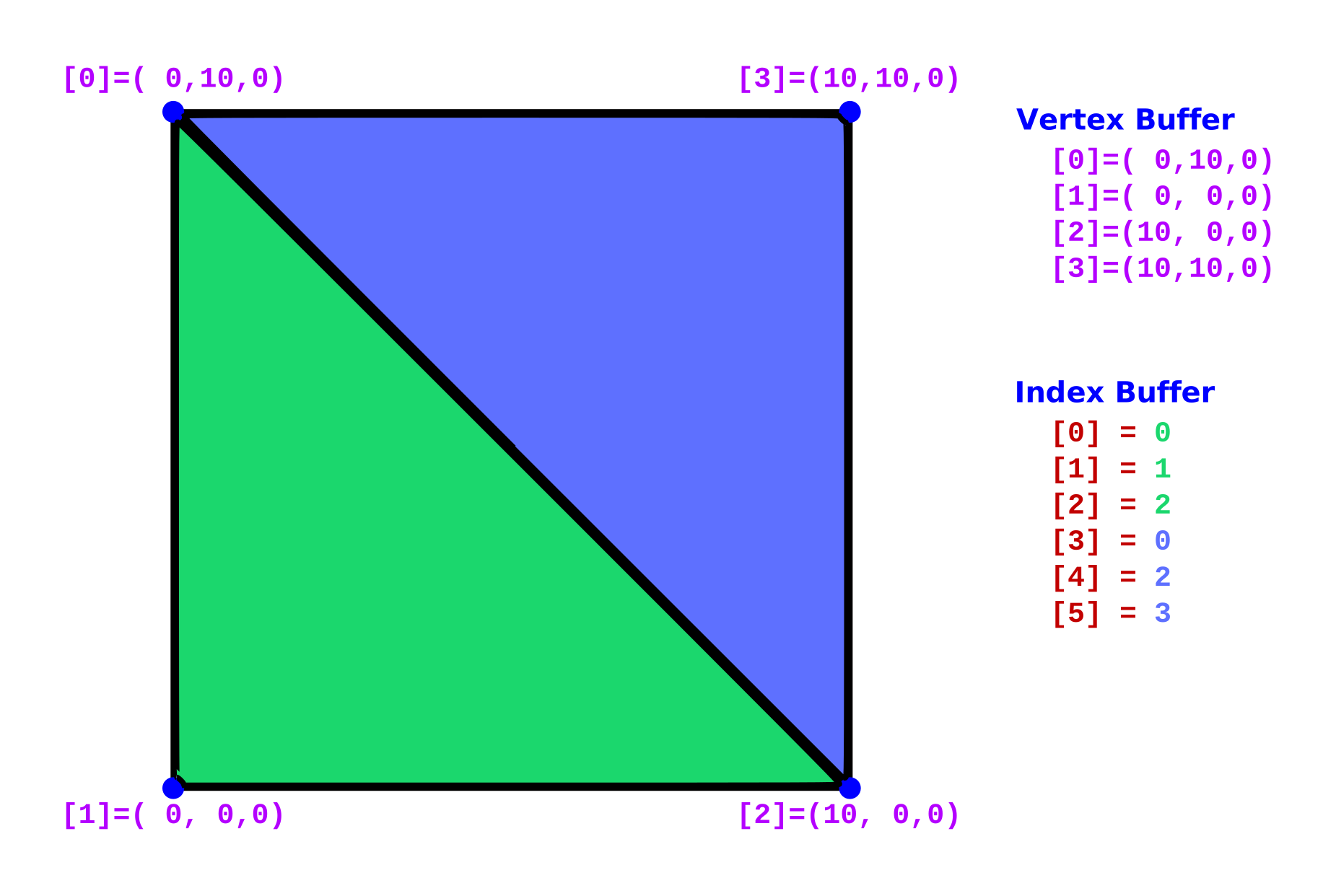
Index Buffer: Responsible for storing the mapping of vertices to triangles. It is a list of integers, with each group of 3 representing a triangle and indexing the vertices to use for that triangle’s points.
The example below shows a simple setup where we render two triangles, using 6 entries in the index buffer but only 4 vertices, since 2 vertices are shared by both triangles along the common edge.
Winding Order
Section titled “Winding Order”One thing to be careful of is the order of a triangle’s indices. This affects a standard 3D rendering optimization called backface culling. Unreal Engine uses counter-clockwise culling, so if a triangle’s points are visually ordered clockwise as referenced in the index list, it will not be rendered. This is a standard and important optimization, as it removes many triangles that cannot be visible because they face away from the view.
This means that when you index your vertices, you should index the points visually counter-clockwise.
Advanced Indexing
Section titled “Advanced Indexing”There are advanced things you can do with index buffers, in combination with the section groups and sections of the RMC. For example:
- You could make one large index buffer for rendering and a separate index buffer for shadows to simplify the geometry used. This can be extremely beneficial, as shadows only care about position, so you could combine duplicates much more aggressively. The RMC exposes this directly through the
DepthOnlyTrianglesstream. - You could make different versions of a section that share a common set of vertices and switch between which one is rendered.
PolyGroups
Section titled “PolyGroups”Within the RMC you have the option to use an extra index stream to define poly groups. There should be 1 entry for each triangle in the associated triangle stream. This is used to easily separate the triangles into groups that can be rendered separately — the RMC turns each poly group into its own section. The RMC assumes the poly groups are contiguous, so all triangles of a particular group are next to each other. There are utilities to sort the triangles by poly group if you want to build them in an arbitrary order and sort them later.
You can see poly groups in action in the ARealtimeMeshExample_Simple_HelloTriangle example
(Source/RealtimeMeshExamples/Private/Simple/RealtimeMeshExample_Simple_HelloTriangle.cpp), which tags a triangle and its reversed copy into two different groups.
Additional Resources
Section titled “Additional Resources”-
More info on triangle primitives (specifically GL_TRIANGLES):
https://www.khronos.org/opengl/wiki/Primitive#Triangle_primitives
-
More info on winding order and face culling: